‘Nifty Fifty’ photowalk

Event Date:

28 May 2026

Event Time:

14:00

Event Location:

Kickback Coffee HQ, Clough Bank, Bollington, Cheshire, SK10 5NZ, United Kingdom

Event Description

Mirrorless and DSLR users bring a 50mm lens, or alternatively set your zoom to 50mm (or equivalent focal length – for example 35mm if using an APS-C crop sensor camera) we will practice composing shots with that one restrictive field of view only – rather than zooming, use your feet to do the zooming!

Smartphone users – please see the additional notes below.

We will meet outside KickBack Coffee on Clough Bank for this photowalk and stay around the canal / Tinker’s Clough / Beehive Cottage area.

Why 50mm Is Such a Good Teacher

  • 50mm closely approximates natural human vision — what you see is roughly what you get
  • It discourages lazy wide-angle storytelling and forces you to move your feet to compose
  • It has a gentle, neutral perspective with minimal distortion, so composition really is everything — there’s nowhere to hide
  • It’s the focal length associated with street photography legends like Henri Cartier-Bresson and Vivian Maier for exactly these reasons

Practical tips for Smartphone users
Modern smartphones typically have multiple rear cameras:

  • Ultra-wide — usually around 13–16mm equivalent (far too wide)
  • Main/primary lens — typically 24–28mm equivalent on most phones (still a bit wide)
  • 2× telephoto — often lands right around 48–56mm equivalent ✓
  • 3× or 5× telephoto — too long (75mm, 120mm+)

For most iPhone 14/15/16 and recent Samsung Galaxy users, tapping the “2×” button in the camera app will get you very close to a 50mm equivalent — this is the sweet spot.

  1. Use the 2× zoom button — don’t pinch-zoom (that’s just cropping and loses quality). On most recent phones the 2× button switches to a dedicated telephoto lens.
  2. Check your phone’s specs — apps like Camera+ or simply Googling your phone model will tell you the exact focal length equivalents. Many phones now display this in the camera app itself.
  3. Older or budget phones with a single lens — if there’s no 2× option, they can use a small amount of digital zoom to reach roughly 50mm, but should be aware this reduces image quality. On a 12MP sensor, cropping to ~1.75× still leaves a usable image.
  4. Avoid the ultra-wide — it’s tempting and fun, but it will completely undermine the compositional discipline we’re trying to build.

Smartphone photographers may actually find the 2× lens on their phone produces some of their sharpest, most pleasing images — it’s often optically excellent and underused. Enjoy the walk!
Ticket Options
Adult
15 Tickets remaining
Free
Total Price : Free
Organized By :  
Total Seats
15
Available Seats
15
Event Schedule Details
Event Location

Kickback Coffee HQ, Clough Bank, Bollington, Cheshire, SK10 5NZ, United Kingdom

Event Location

BPG Help

Look for the

I’m here to help! Let me be your guide to familiarise you with our site.

This is your starting page

To get started, use the left menu on your laptop to explore membership details, upcoming events, and ways to get involved in activities and discussions. We encourage you to post on this page and don’t forget to add your images to the members’ archival galleries for inspiration and ideas.  Our photographic pages are also grouped together in the main menu, making it even easier to find what you’re looking for.
For ease of use, popular pages are  accessible from each menu section. To make the most of your membership – please read the navigation hints underneath.

We encourage you to post on this page and don’t forget to add your images to the members’ archival galleries for inspiration and ideas. 

To get started, simply open the  hamburger menu to find galleries of photowalks, photo-wall entries, and member profiles. Use the ‘+’ to open the sub-menus.  You’ll  find information about upcoming events, including workshops, photography classes, and community gatherings.
Our photographic pages are all grouped together, making it even easier to find what you’re looking for.
For ease of use, popular pages are  accessible from each menu section. To make the most of your membership – please read the navigation hints underneath.

Welcome to your Member Profile Access Guide

The Profile Page is Your Personal Hub

  • Our website is built for members like you – to connect, share, and interact with others. To make this possible, we store some basic information about you, which helps personalize your experience.
  • Everyone uses the site differently, so some areas may be more relevant to you than others.  This quick guide will help you to get the most out of your membership.
Your Profile Page brings together everything about your activity… all in one place!

The Profile Page lists your Activity

  • Your Profile Page brings together everything about your activity on our site – posts, comments, messages, photos, subscriptions, and more – from your most recent entry to your first.

Your Profile Page lists all your activity… organised chronologically!

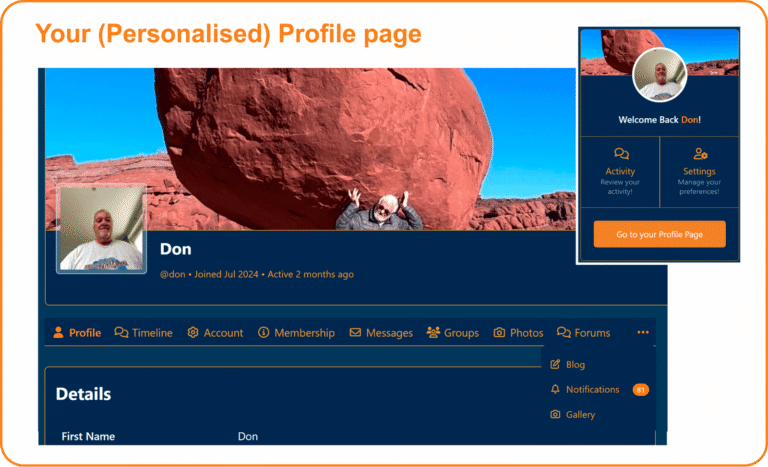
The Profile Page contains...

  • Your Profile Info
  • Timeline – a feed of all your activity
  • Account Settings – update login, notifications, privacy, data export, or delete your account
  • Membership – view or change your membership, see past transactions
  • Messages – conversations with other members
  • Groups – your subscribed groups
  • Photo Gallery – images you’ve posted
  • Forums & Blogs – your contributions
  • Notifications – alerts and updates
  • Personal Gallery – create your own photo collection

Navigate to your membership Profile

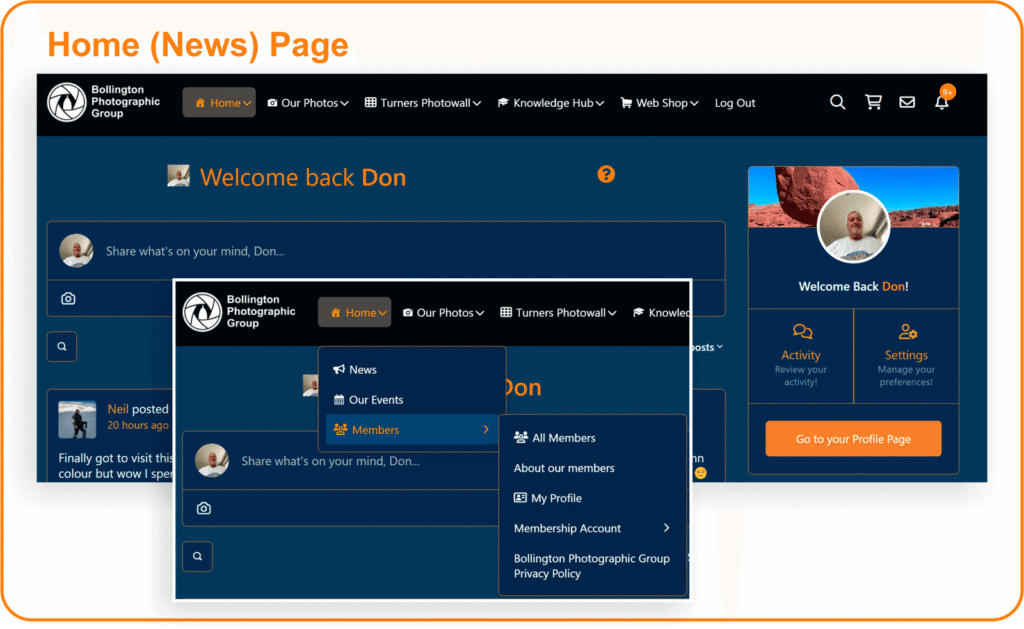
  • Easiest way: From the members’ news page, click the large orange button under your profile photo labeled “Go to your profile page”.
  • On desktop or mobile: Use the Home menu → Members dropdown → then select Profile Page or Membership Account.

Your Membership

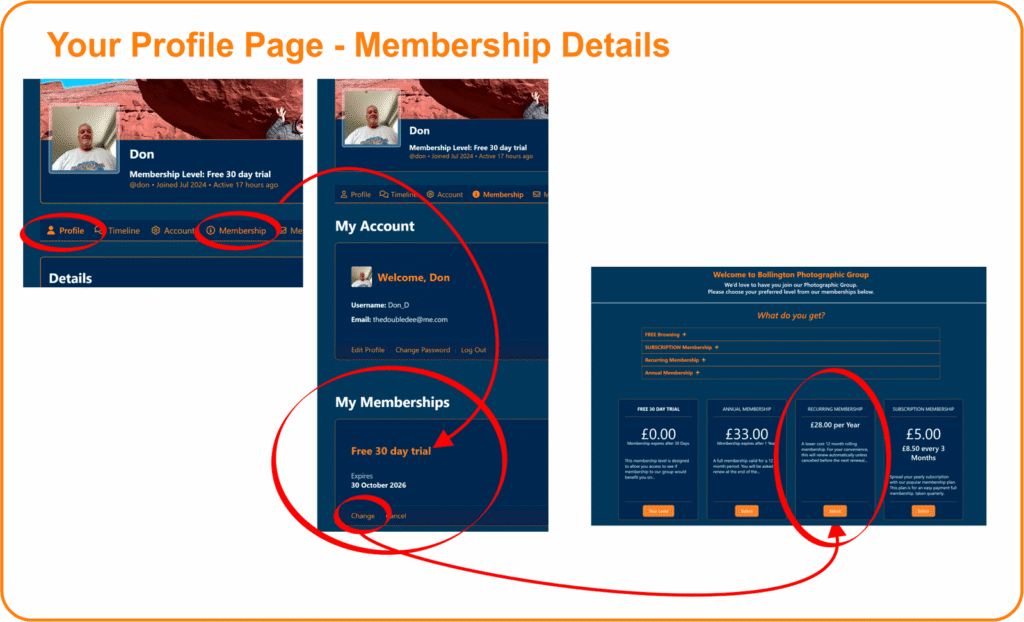
You can change or cancel your subscription anytime during your membership.
  • Follow: Home → Members →  Membership Account.
  • Or: Home →  Profile Page → Membership Account.
How to adjust your subscription:
  • At any stage during your membership period, you may alter (or cancel – shock horror!!) your subscription payments to the group. Please note this is only valid with a current membership.
  • Any new subscription selected will commence after the expiry of the previous subscription period.
💳 Note: Payments are securely handled by Stripe. We don’t store and cannot access your card details. If your subscription lapses, it will be cancelled for security reasons, and you’ll need to reapply for membership.
How can we help you?

Thank you for your interest in Bollington Photographic Group. 

Please fill in your details and we will get back to you as quickly as we can.