View Categories

What is bokeh?

Bokeh is a Japanese word meaning the softness and quality of the out-of-focus area of a photo. For example, a portrait might be sharply in focus but the environment behind the subject might be rendered out of focus giving subject separation and presenting a pleasing three-dimensional effect.

There are three factors controlling bokeh – the main factor is the size of a lenses’ aperture and how open it is – for example an aperture opened to f1.4 will result in a narrower depth of field – (area of acceptable sharpness) while any background elements will be rendered out of focus. The second factor relates to subject to camera distance – the closer the lens is focussed to the subject relative to any background elements, the more the out of focus effect. Lastly, the focal length of the lens. Longer telephoto lenses will produce a narrower depth of field while wide angle lenses tend to produce a deeper depth of field (acceptable sharpness) in a scene.

Some smart-phones (such as newer models of the iPhone) are now implementing an artificially created ‘bokeh’ effect which is created using artificial intelligence (computational photography) within the phone ‘on the fly’ and can sometimes even retrospectively apply this effect. While this can be convincing the software can occasionally get areas which are supposed to be in sharp focus blurry and other areas sharp (when they should be out of focus) or they can add odd artefacts and dark edges to a subject. There is greater fine control in creating an artificial bokeh effect by using masks in post production software such as Adobe Photoshop.

[ more to follow ]

Powered by BetterDocs

BPG Help

Look for the

I’m here to help! Let me be your guide to familiarise you with our site.

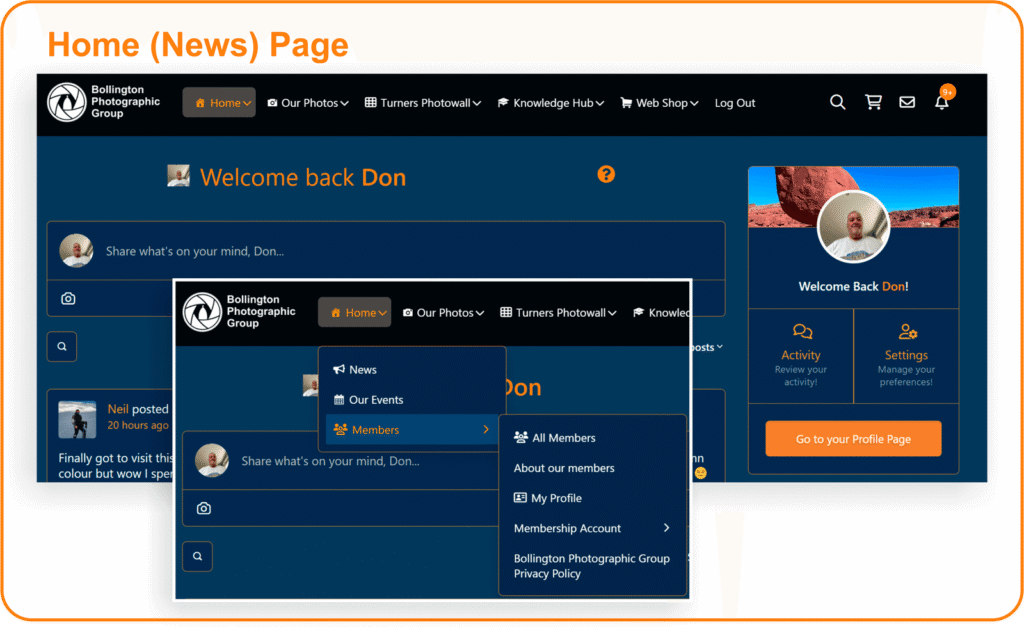
This is your starting page

To get started, use the left menu on your laptop to explore membership details, upcoming events, and ways to get involved in activities and discussions. We encourage you to post on this page and don’t forget to add your images to the members’ archival galleries for inspiration and ideas.  Our photographic pages are also grouped together in the main menu, making it even easier to find what you’re looking for.
For ease of use, popular pages are  accessible from each menu section. To make the most of your membership – please read the navigation hints underneath.

We encourage you to post on this page and don’t forget to add your images to the members’ archival galleries for inspiration and ideas. 

To get started, simply open the  hamburger menu to find galleries of photowalks, photo-wall entries, and member profiles. Use the ‘+’ to open the sub-menus.  You’ll  find information about upcoming events, including workshops, photography classes, and community gatherings.
Our photographic pages are all grouped together, making it even easier to find what you’re looking for.
For ease of use, popular pages are  accessible from each menu section. To make the most of your membership – please read the navigation hints underneath.

Welcome to your Member Profile Access Guide

The Profile Page is Your Personal Hub

  • Our website is built for members like you – to connect, share, and interact with others. To make this possible, we store some basic information about you, which helps personalize your experience.
  • Everyone uses the site differently, so some areas may be more relevant to you than others.  This quick guide will help you to get the most out of your membership.
Your Profile Page brings together everything about your activity… all in one place!

The Profile Page lists your Activity

  • Your Profile Page brings together everything about your activity on our site – posts, comments, messages, photos, subscriptions, and more – from your most recent entry to your first.

Your Profile Page lists all your activity… organised chronologically!

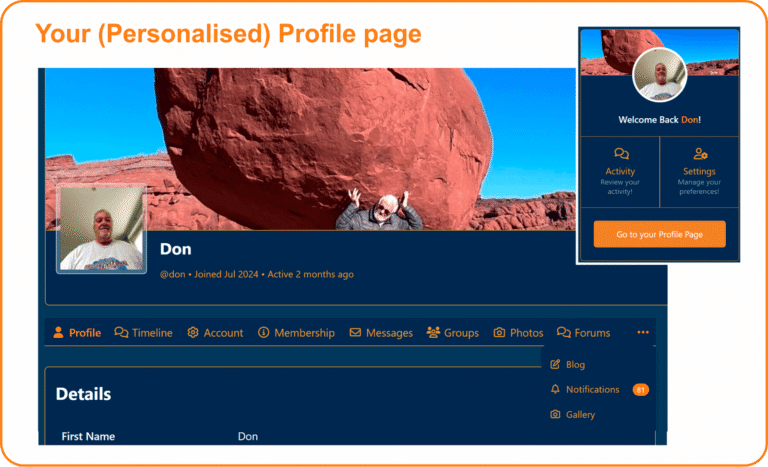
The Profile Page contains...

  • Your Profile Info
  • Timeline – a feed of all your activity
  • Account Settings – update login, notifications, privacy, data export, or delete your account
  • Membership – view or change your membership, see past transactions
  • Messages – conversations with other members
  • Groups – your subscribed groups
  • Photo Gallery – images you’ve posted
  • Forums & Blogs – your contributions
  • Notifications – alerts and updates
  • Personal Gallery – create your own photo collection

Navigate to your membership Profile

  • Easiest way: From the members’ news page, click the large orange button under your profile photo labeled “Go to your profile page”.
  • On desktop or mobile: Use the Home menu → Members dropdown → then select Profile Page or Membership Account.

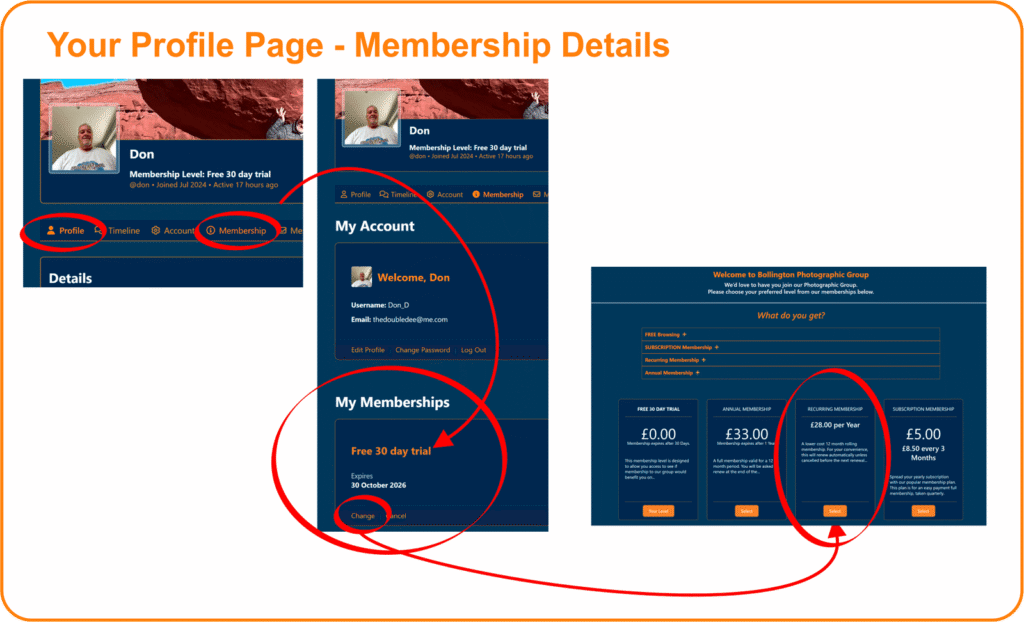
Your Membership

You can change or cancel your subscription anytime during your membership.
  • Follow: Home → Members →  Membership Account.
  • Or: Home →  Profile Page → Membership Account.
How to adjust your subscription:
  • At any stage during your membership period, you may alter (or cancel – shock horror!!) your subscription payments to the group. Please note this is only valid with a current membership.
  • Any new subscription selected will commence after the expiry of the previous subscription period.
💳 Note: Payments are securely handled by Stripe. We don’t store and cannot access your card details. If your subscription lapses, it will be cancelled for security reasons, and you’ll need to reapply for membership.
How can we help you?

Thank you for your interest in Bollington Photographic Group. 

Please fill in your details and we will get back to you as quickly as we can.